The analysis, as the editor draws it.
A sample 32 × 24 ft villa. Drag it sideways to turn North and watch the zones and their areas move. The tabs switch the view; the zone count changes the table.
Do this on your own planZones
North 0°
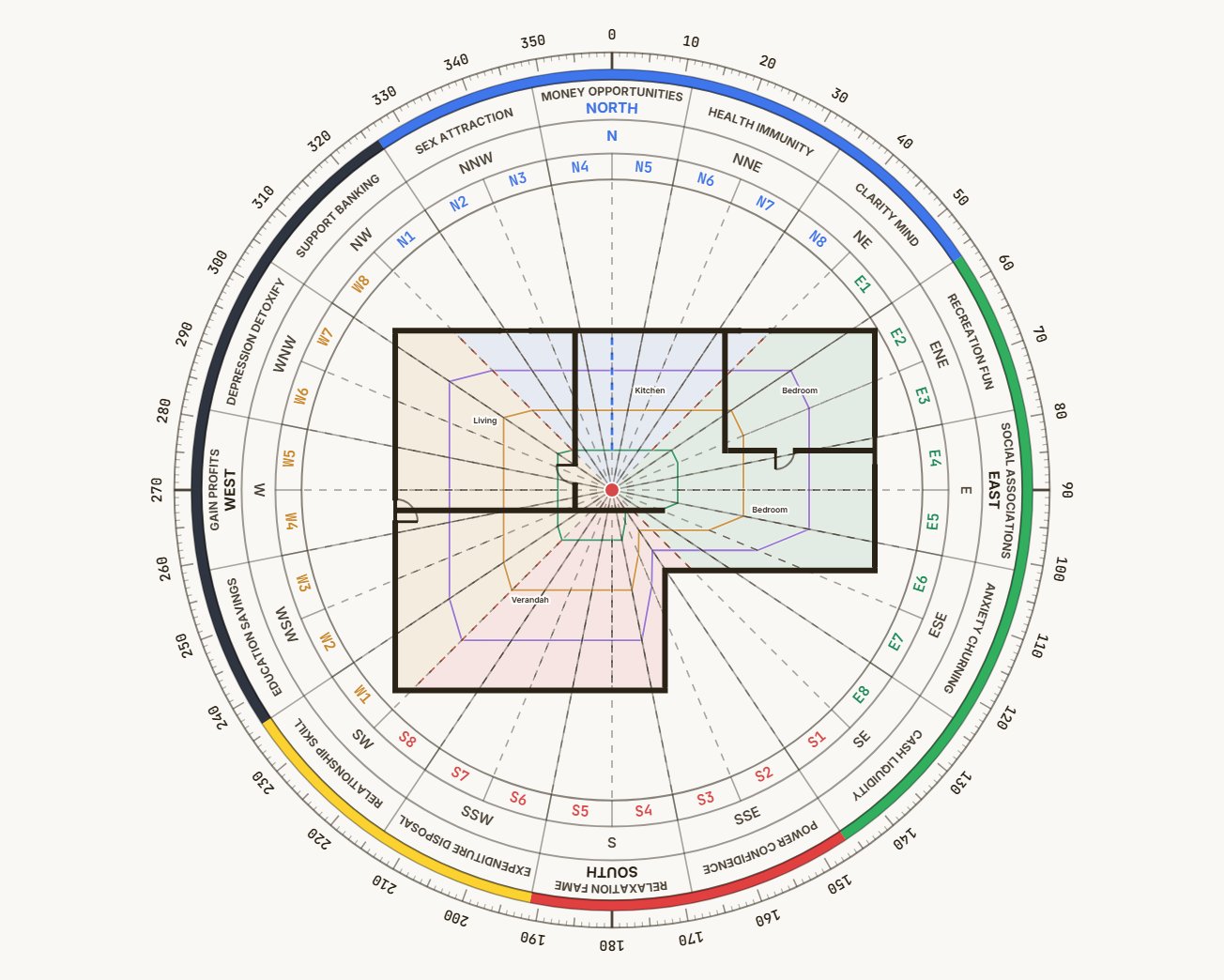
Drag the plan sideways to turn North. Arrow keys work too.
| Zone | Share | Area | % |
|---|---|---|---|
| N5 | 11 ft² | 1.7 | |
| N6 | 12 ft² | 1.9 | |
| N7 | 14 ft² | 2.2 | |
| N8 | 19 ft² | 2.9 | |
| E1 | 28 ft² | 4.3 | |
| E2 | 38 ft² | 5.8 | |
| E3 | 33 ft² | 5.0 | |
| E4 | 31 ft² | 4.7 | |
| E5 | 31 ft² | 4.7 | |
| E6 | 29 ft² | 4.4 | |
| E7 | 13 ft² | 2.0 | |
| E8 | 7 ft² | 1.1 | |
| S1 | 5 ft² | 0.7 | |
| S2 | 6 ft² | 0.9 | |
| S3 | 14 ft² | 2.2 | |
| S4 | 18 ft² | 2.7 | |
| S5 | 18 ft² | 2.7 | |
| S6 | 19 ft² | 2.9 | |
| S7 | 23 ft² | 3.5 | |
| S8 | 30 ft² | 4.5 | |
| W1 | 34 ft² | 5.2 | |
| W2 | 27 ft² | 4.0 | |
| W3 | 23 ft² | 3.4 | |
| W4 | 21 ft² | 3.2 | |
| W5 | 21 ft² | 3.2 | |
| W6 | 23 ft² | 3.4 | |
| W7 | 27 ft² | 4.0 | |
| W8 | 27 ft² | 4.2 | |
| N1 | 19 ft² | 2.9 | |
| N2 | 14 ft² | 2.2 | |
| N3 | 12 ft² | 1.9 | |
| N4 | 11 ft² | 1.7 |
Three readings of one plan.
Switch between them with one key. Each has its own pages in the report.
How each view is built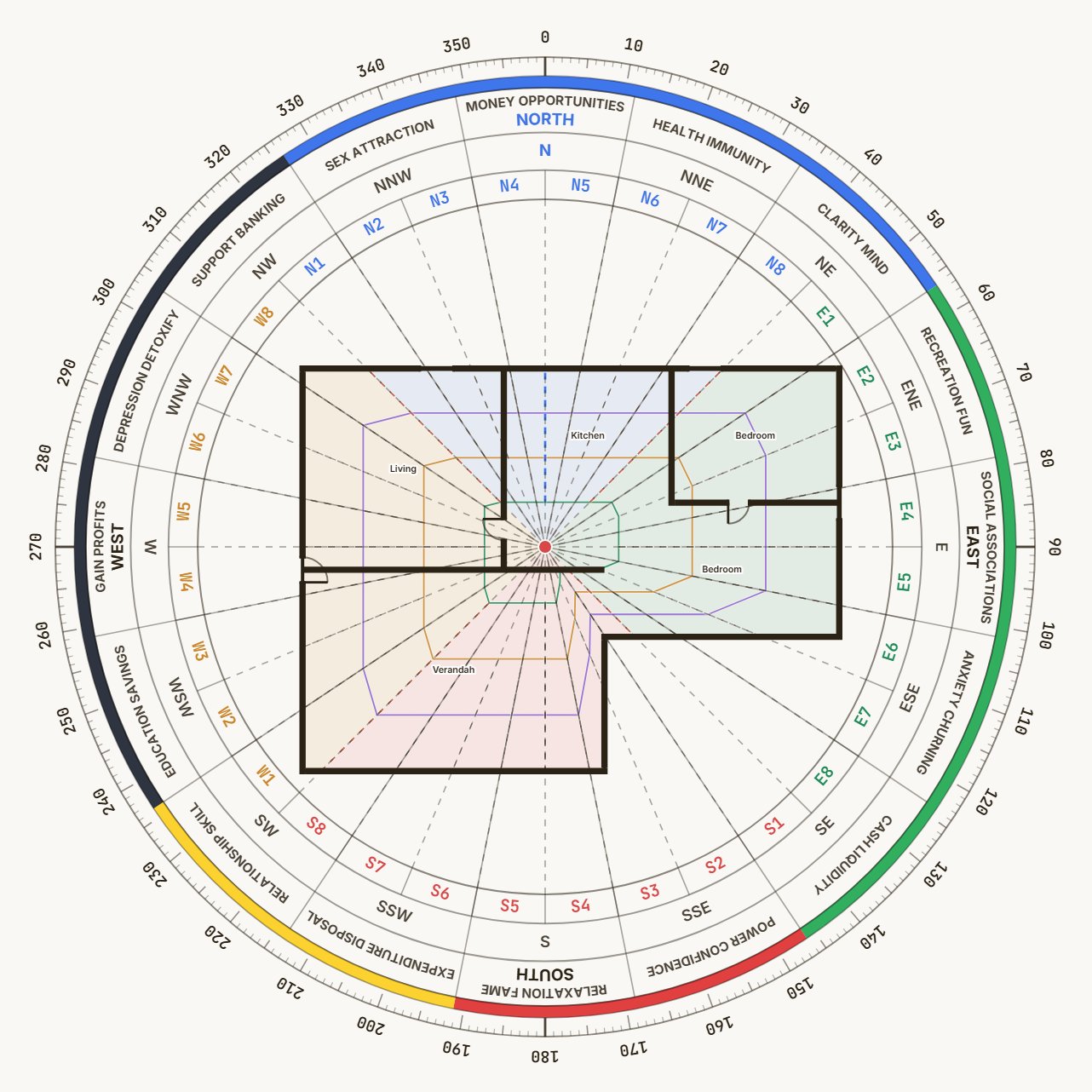
8, 16 or 32 zones from the true centre, each one measured, with the degree ruler and the attribute band.
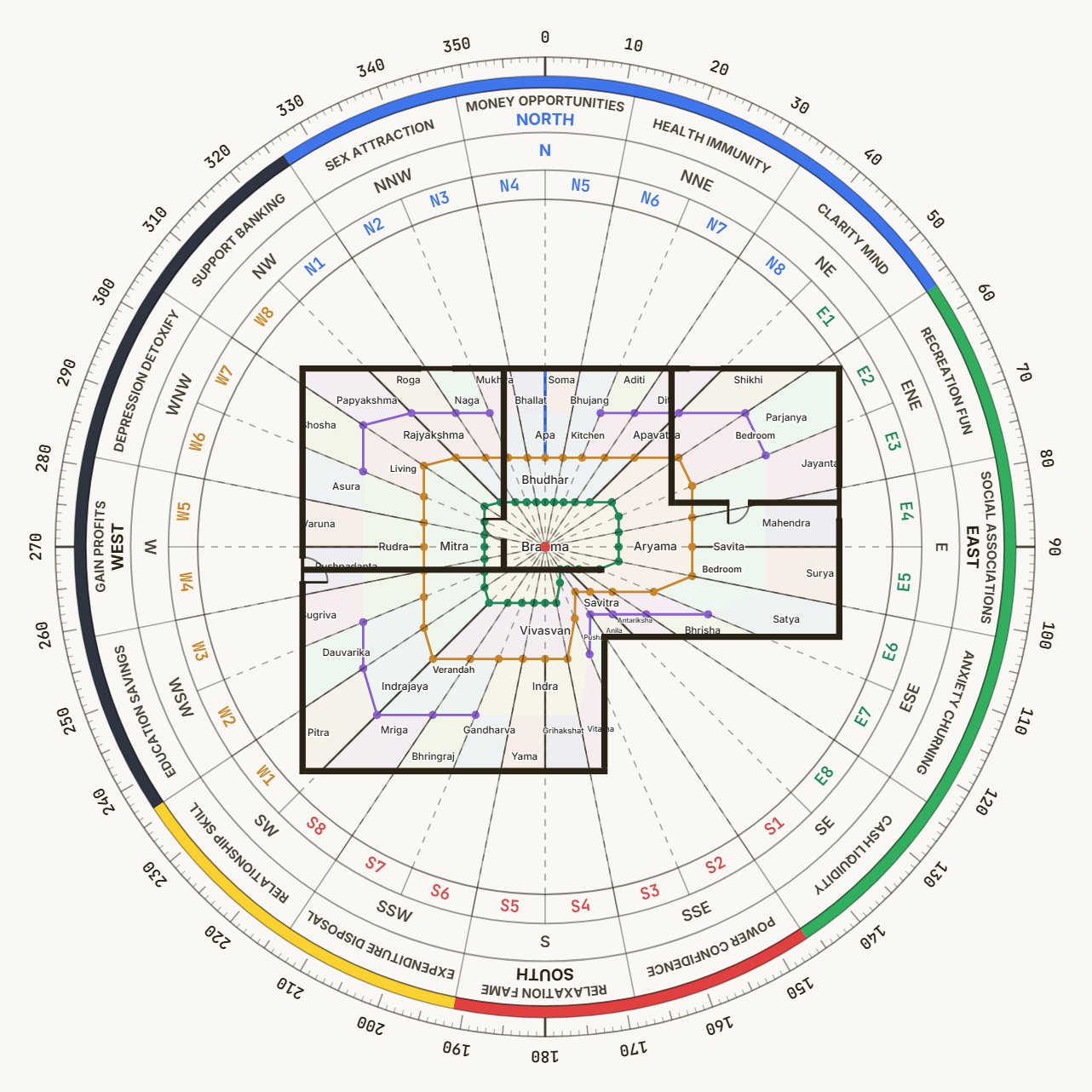
Brahma at the centre, four inner, eight middle, thirty-two on the rim. Click one for its guna, its domain and its remedy.
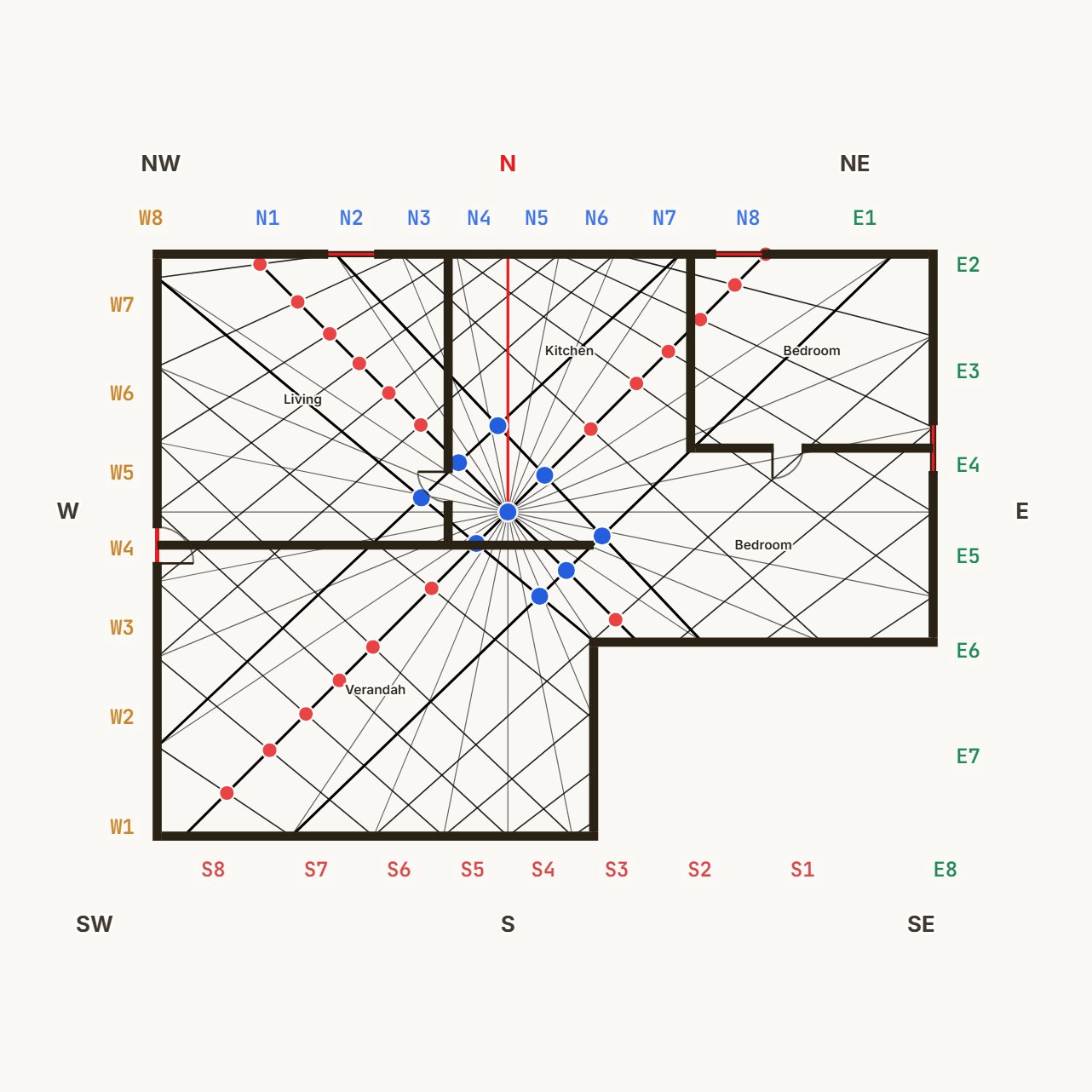
The 9 × 9 grid with its diagonals and the nine Maha Marma. A column or a toilet on one is caught in the drawing, not on site.
From the drawing to the report.
Five steps. The first three take a few minutes on a plan you have never seen.
Each step in detail- 01
Upload the drawing
A photo, a scan or a PDF page. Or draw the walls on a blank sheet with a one-foot grid.
- 02
Mark North and set the scale
Turn the compass to the site's true North. Click two ends of a known wall and type its length; every figure then reads in feet.
- 03
Trace the plot
Click the corners, or let auto-trace find them on a clean scan and correct what it missed. Close the outline and the chakra lands on it.
- 04
Read and annotate
Switch between the Shakti Chakra, the 45 devtas and the marma points. Move the centre if the site demands it. Pin remedies where they go.
- 05
Export
A PDF in English or Hindi with your name on the cover, or a link the client opens without an account.
No drawing to upload? Draw it.
A gridded sheet, one square to a foot. Draw the walls, cut the doors, place the fixtures. When the outline is closed the same analysis follows, and the report prints your drawing.
Start on a blank sheet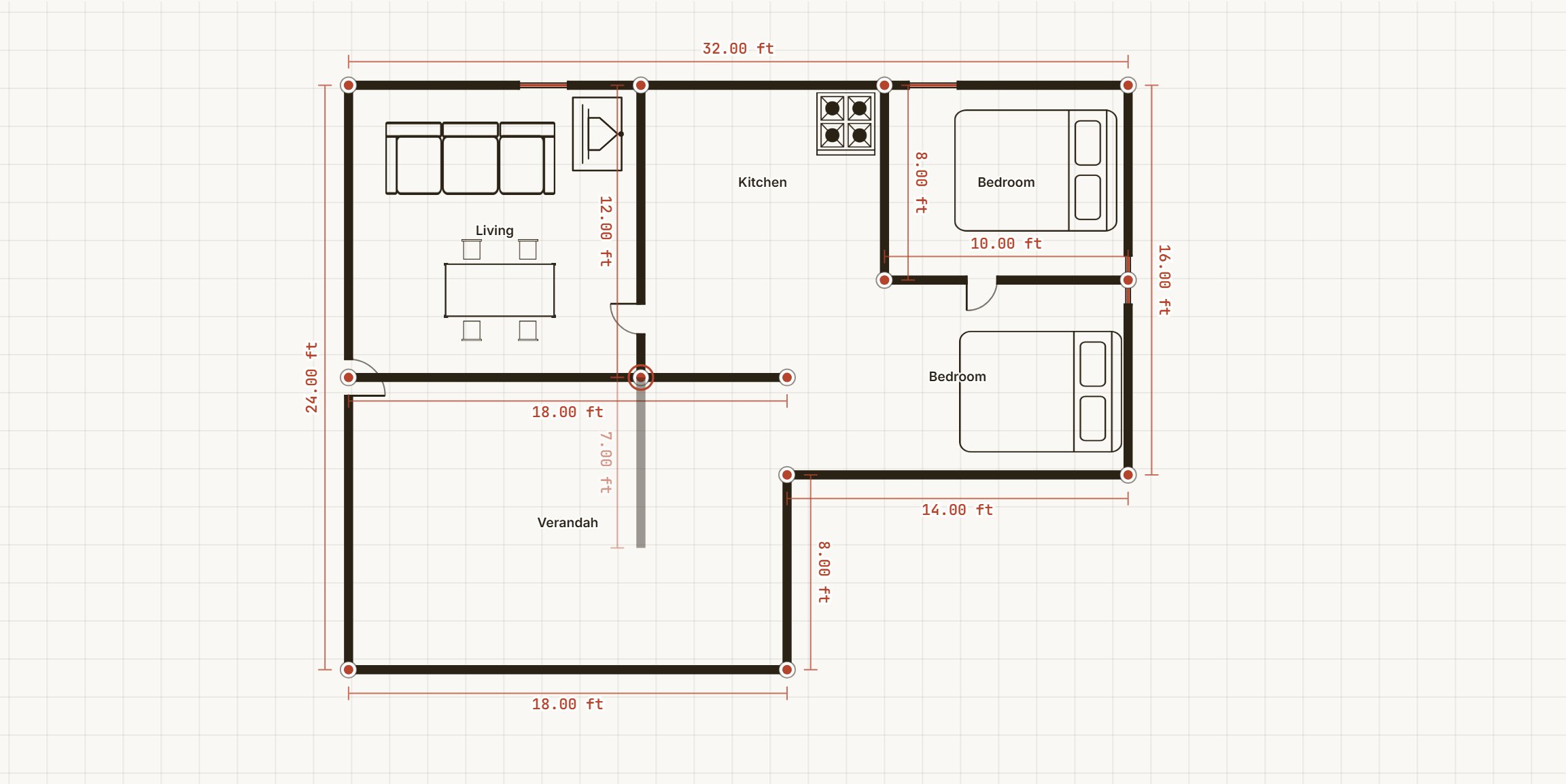
The sample villa on the sheet, mid-drawing: walls with their lengths, a wall being laid from the living-room corner, the furniture in place. The chakra is not on it yet.
Walls
Click to start, click to end. A wall snaps to the one-foot grid and to the end of the wall next to it. Four thickness presets, from a 4-inch partition to a 12-inch outer wall. The length is written on the drawing as you go, so the scale is set before you have thought about it.
Doors, windows, fixtures
Cut an opening into any wall: a single or double door, a sliding door, a window, a plain gap. Then 149 plan symbols in 11 categories, from a queen bed to a server rack. Each fixture is rated against the direction it sits in, and the verdict shows on the symbol.
Then the same analysis
Press Generate and the plot outline is derived from the outer walls. The chakra, the devtas and the marma grid land on it exactly as on an uploaded plan, and the report prints the drawing to scale. A client’s scan can sit faded under the grid while you draw over it.
34 ready-made plans to start from
Sized to common Indian plots, rooms already named and furnished. Pick one, move the walls.
- Homes
- Studio / 1 RK, 1 BHK, 2 BHK, 3 BHK, 4 BHK villa, L-shaped house, Row house
- Offices
- Small office, Open-plan office, Corporate office, Coworking space, CA / law firm, Call centre / BPO, L-shaped office, Bank branch, Clinic, Polyclinic / OPD
- Shops & business
- Shop, Medical store, Showroom, Jewellery / boutique, Café, Restaurant, Salon / parlour, Supermarket, Gym / fitness, Hotel ground floor, Coaching centre
- Industrial
- Small workshop, Warehouse, Factory shed (medium), Large factory, Cold storage / godown, L-shaped industrial plot
Every page of the report, and what it says.
One document, in the order a client reads it. Chapters you did not use are left out.
Make one from your own plan- 01
Cover
Your name, your logo, the client, the site, the date.
- 02
Plan and plot boundary
The drawing as traced, with North and the scale you set.
- 03
Shakti Chakra
8, 16 or 32 zones over the plan, with the degree ring.
- 04
Zone-wise area
Every zone in square feet and as a share of the plot, plus the balance chart.
- 05
45-Devta Mandala
All four rings named, with each devta's guna and what it governs.
- 06
Marma points
The nine Maha Marma and the diagonal chords, so nothing pierces them.
- 07
Entrance
Which pada the main door sits in and how it reads.
- 08
Sections
Each room or wing you analysed, with its own chakra and numbers.
- 09
Remedies and notes
Your callouts, in full, with the pictures you attached and the worklist status.
At a glance.
The facts a practice checks before adopting anything.
The longer answers, in the help pages- Accepts
- JPG, PNG, PDF (choose the page), or a drawing made on the sheet
- Zones
- 8, 16 or 32, with the standard zone codes
- Views
- Shakti Chakra, 45-Devta Mandala, Marma points, zone distribution
- Units
- Feet and square feet, from a scale you set on the drawing
- Report
- PDF in English or Hindi; a read-only web link with optional passphrase and expiry
- Workspace
- Clients, floors, sections, restore points, trash, command palette
- Works on
- Desktop, tablet and phone, in the browser. Nothing to install.
- Storage
- Server-side, per account. Export as JSON or delete at any time.